
Report Inbox
Tools > Shipready > Playtest > Report Inbox reads the zips testers send you.
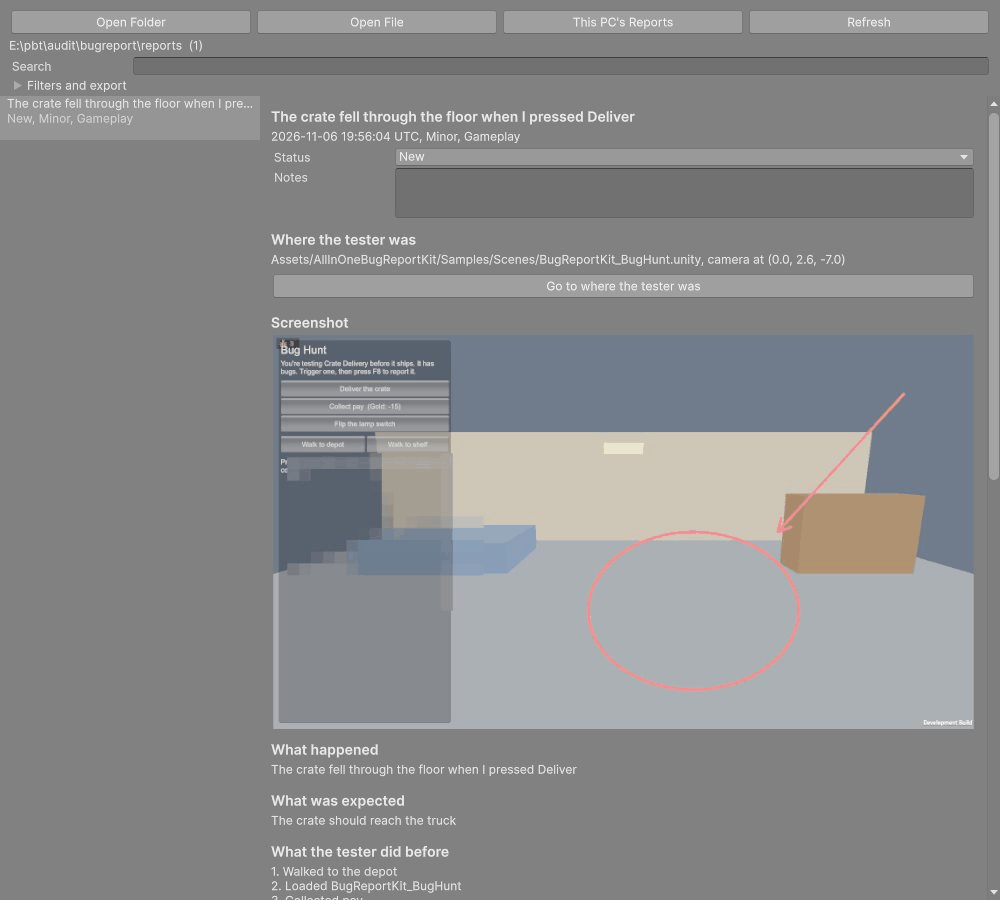
- Open Folder lists every report in a folder, Open File opens one, and This PC's Reports lists the ones made on this computer while playing in the Editor.
- Pick a report on the left. On the right: what happened, the screenshot, the steps, recent events, game state, system info and the log.
- Blue links under each error open your script at that line, even when the report came from another machine, as long as the script is at the same place in this project.
- Go to where the tester was opens the tester's scene and puts the Scene view where their camera was.
- Status (New, Confirmed, In Progress, Fixed, Won't Fix) and Notes are saved in
Assets/RareGeometryData/Shipready/ReportInboxNotes.json, a plain file you can commit and share with your team.
Search looks through what happened, the steps, your notes and the log. Filters and export narrows the list by status, category and severity, and Export CSV saves what's shown for a spreadsheet or another tracker.
The window fits any width: narrow, the list sits above the report.