
Make Playable
Check > Playable hands what you built to the rest of your game, one tick at a time and only what you ask for. Nothing here is needed to build levels, and everything can be removed again.
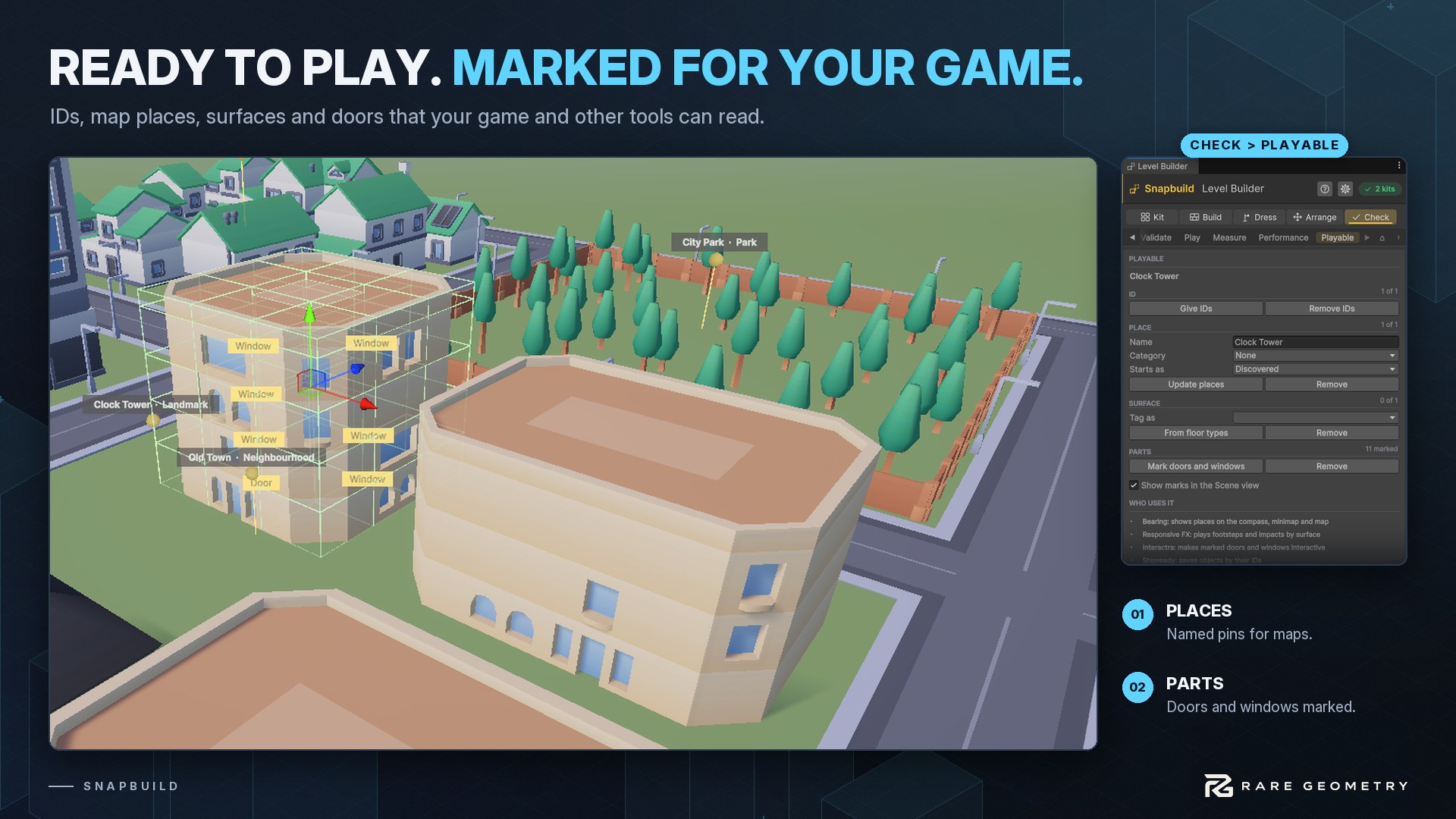
Select placed objects (a building, a door, a whole room), then use the sections below.
ID #
Give IDs adds a stable ID to each selected object: a unique ID that stays the same between sessions. Save systems and other products refer to the object by it. A copy of an object gets an ID of its own.
Place #
Mark as a place makes the selected objects places players can find: a shop, a tower, the way out.
| Setting | What it is |
|---|---|
| Name | The name players see. Empty: the object's name. |
| Category | For map filters and legends (Shop, Door, Landmark). Pick one in use, or New... |
| Starts as | Not found yet, found, the current objective, done, or not shown at all. |
A map or compass product shows every place by itself. With Bearing in the project your places appear on its compass, minimap and map with no setup. With none installed a place does nothing and costs nothing.
From code:
using RareGeometry.Core;
using RareGeometry.Snapbuild;

var mill = GetComponent<SnapbuildPlace>();
mill.Label = "Old Mill";
mill.State = PoiState.Completed;          // every map shows the change

foreach (var place in SnapbuildPlaces.All) { /* every enabled place */ }
Surface #
Tag as gives the selected objects a shared surface (wood, stone, grass): what they are made of, as every Rare Geometry product understands it. With Responsive FX in the project, footsteps and impacts on them sound right.
From floor types does it for you: ground and road pieces already know their floor type (Settings > Floors), and
each gets the shared surface of the same name. Surface assets that do not exist yet are made in your data folder
(Surfaces/).
Parts #
Mark doors and windows marks each door, window and stairs piece of the selected rooms (by their roles in Kit > Roles) with a Building Part component, and gives doors an ID. Your game finds them without searching by name:
using RareGeometry.Snapbuild;

foreach (var door in SnapbuildParts.Of(SnapbuildPart.Door))
{
    // add your door script, or let an interaction product take over
}
Seeing the marks #
With Show marks in the Scene view on (and the Scene view's Gizmos on), every place has a pin with its name and category, and every marked door, window and stairs a small tag, so you can check a level's marks at a glance. They are only drawn in the editor.
Signs at run time #
Signs made with Dress > Signs can be changed while the game runs:
using RareGeometry.Snapbuild;

SnapbuildSigns.SetText(sign, "CLOSED");            // keeps fitting the board
SnapbuildSigns.SetColor(sign, Color.red);
SnapbuildSigns.SetAll(s => Translate(s.text));     // every sign, for example a translation
Translations by key. Give a sign a Key in its Inspector (for example shop.open), then set every keyed sign
from your own table in one call. Signs with no key are left as they are:
SnapbuildSigns.Translate(key => myTable.Get(key, language));
SnapbuildSigns.Changed tells you when a sign was changed this way.
Decals at run time #
Decals made with Dress > Decals can be changed while the game runs, in builds too. No material is made per decal:
SnapbuildDecals.SetImage(decal, poster2);                 // its height follows the new image
SnapbuildDecals.SetTint(decal, new Color(1, 1, 1, 0.5f)); // alpha fades it
SnapbuildDecals.SetWidth(decal, 3f);                      // metres
SnapbuildDecals.SetShown(decal, false);                   // hide it, keep it
SnapbuildDecals.Apply(decal);                             // after changing its fields yourself
Cables and bunting: change a Cable's fields and call its Rebuild().
Who uses it #
The last section of the panel lists the Rare Geometry products in the project and what each does with what you marked. None is needed: marks made now are picked up when a product is added later.